
Food Entry
MyNetDiary provides several convenient ways to enter foods. For many people, in-place entry is the fastest - just type few words from food name and pick the food from found matches. If you have eaten this food before, it will be shown near the top of the list as soon as you start typing. The "Food Catalog" and "My Foods" allow browsing and selecting from catalog windows. Here are all the ways to enter foods, use what works best for you:
- In-place entry directly into the daily food table.
- Selecting from the "Food Catalog" window.
- Selecting from the "My Foods" window (contains all foods you have ever eaten).
- Picking from the "Recent Foods" popup showing three recent meals.
- Copying the "Same" foods from the yesterday's meal.
- Entering a new custom food - if you cannot find it in MyNetDiary food database.
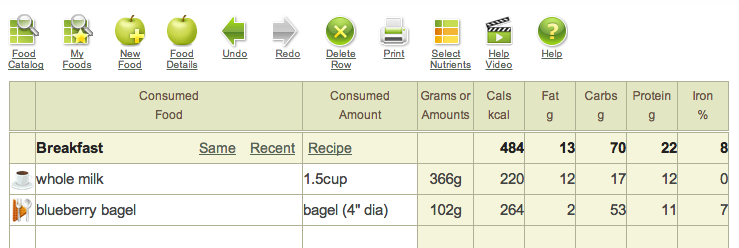 In-place entry –
click & type Custom
foods
In-Place Food Entry
For many people, in-place entry is the fastest and most convenient way to enter foods. As you type words from the food name, you will instantly see matches found in the MyNetDiary food database. Pick the food needed from the list and then enter the amount you ate.
When you enter foods by typing their names in the food entry table and pick one of the found suggestions, MyNetDiary remembers your choice, but also remembers the words you used. For example, if you typed whole milk and picked Milk whole 3.25% milkfat, we will use that food to calculate nutrition information, but we will also keep your input whole milk as the food name. Keeping the food name you typed is easier on your eyes. Food details shows the full name of the food. We recommend using two or three full words from the food name, so it will be not too long, and you still will be able to distinguish it from similar foods you eat. For example, if you only drink whole milk, it makes sense to type and use milk as your short food name. If you occasionly drink different kinds of milk, it would makes sense to use whole milk for Milk whole 3.25% milkfat, low-fat milk for Milk reduced fat fluid 2% milkfat with added vitamin a, and nonfat milk for Milk nonfat fluid with added vitamin A fat free or skim.
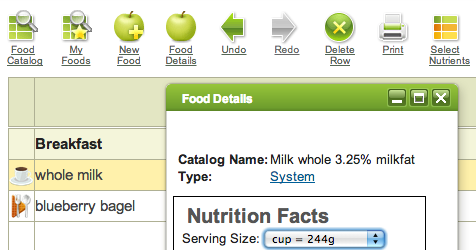 Select food row &
click Food Details
MyNetDiary remembers your choices; the next time you need to enter "milk", you can just type milk, and all foods you have ever eaten that contain word milk will be shown at the top of the list. Actually, you only need to type the first few starting letters to start seeing food matches. Quite a time saver!
"Food Catalog"
If you prefer browsing to typing, MyNetDiary provides a "Food Catalog" - popup window that allows to browse the entire food database and select foods from it.
"My Foods"
As MyNetDiary remembers your food choices, it collects and organizes them as My Foods. It's like "favorites" organized for you on the fly, without any upfront efforts. After a few weeks of using MyNetDiary, "My Foods" will gather the foods you typically eat and let you quickly select them from the "My Foods" window - if you like selecting instead of typing.
"Same" and "Recent"
If you often eat the same foods, MyNetDiary provides a couple of useful shortcuts. First, if you eat exactly the same foods as you ate yesterday (for example, the same breakfast) you can copy it with one click on the "Same" link. The "Recent" link shows meals from the past three days, allowing you to pick and match foods. In either case, both foods and their amounts will be copied. Of course, you could change amounts or add or delete foods afterwards.
Custom Foods
If you cook your own recipes or cannot find some food in the MyNetDiary food database, you can always enter it as a custom food. Click the "New Food" button and simply enter information from the food label. Use the food name that is convenient to you, not necessarily the one from the food label. After you save the food, you can type its name in the food entry table, or pick it from the "My Foods" window.


