Pacer Pedometer and Step Tracker is an app popular with people wanting to track distance, duration, pace, calories burned, and total steps.
While there is no way to connect Pacer with MyNetDiary or PlateAI directly, it is possible to establish a one-way connection between the apps via iOS Health App. Pacer can read data from the iOS Health App, which can be provided by our app.
Please note: MyNetDiary and PlateAI will NOT recognize and read data by Pacer because Pacer can only read data from iOS Health and not write.
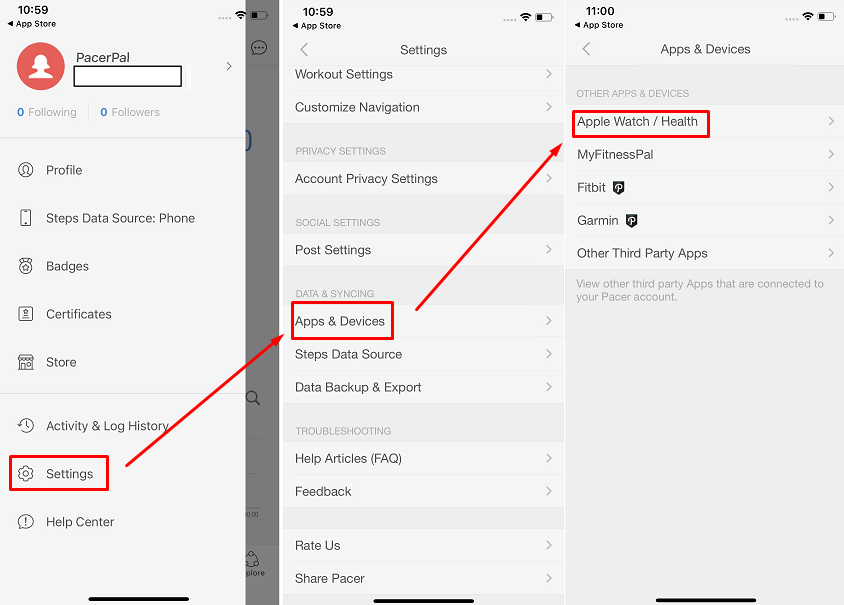
To link Pacer with iOS Health App, access the Settings (under your profile) - choose Apps and Devices - choose Apple Watch/Health and connect.
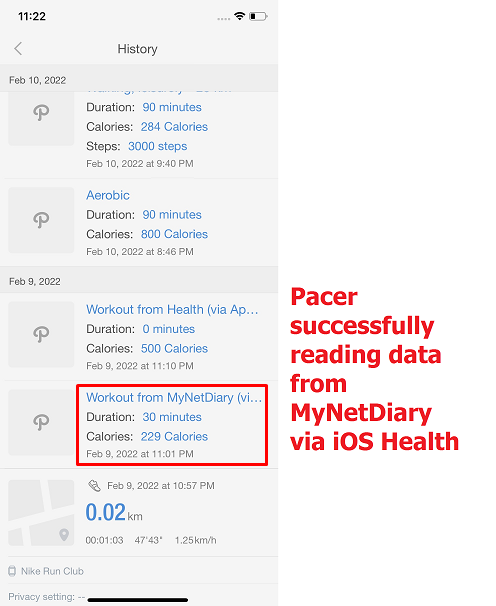
Provided all the necessary permissions were added and MyNetDiary or PlateAI have imported an activity to iOS Health App - Pacer should read and log it.
Here is an example of activity imported from MyNetDiary into Pacer:
For any further questions regarding Pacer functionality and it's sync with iOS Health App, please reach out to Pacer Support.
If you don't know how to link our app with iOS Health App, please watch the following tutorial video.