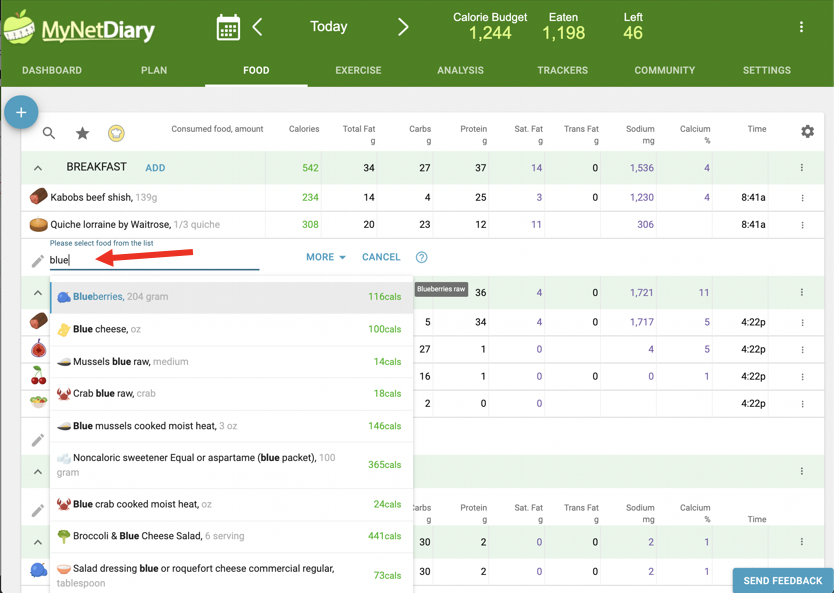
Click in the food name field in the food table and start typing. Suggestions appear as you type, so you never open a separate search page. Use the arrow keys to pick the food, press Tab to reach the amount field, type your portion, choose the serving size, then Tab to the next row.
The website is designed to make food entry as fast and easy as possible.
To search for a food item, click in the food name field within the food table and start typing. Suggestions will appear instantly as you type—there’s no need to navigate to a separate search page. Once you see the correct food in the dropdown, use the arrow keys (↑/↓) to select it.
Next, press the Tab key to move to the amount field. Enter your portion (supports formats like 2, 1.5, or 2/3). Then, using the arrow keys again, choose your serving size from the dropdown. Press Tab again to proceed to the next row and repeat as needed.
For more help, check out this video tutorial on searching and logging foods: Searching Foods.
Related questions
How do I quickly find a food on the website?
Click the food name field directly in the food table and start typing. Suggestions appear immediately, so no separate search page is needed. When the correct result appears, use the up or down arrow key to select it.
Can I log foods on the website using only the keyboard?
Yes. Select a suggested food with the arrow keys, press Tab to reach the amount, enter the portion, use the arrow keys to choose a serving size, and press Tab again to move to the next row.
What portion formats can I enter on the website?
The amount field accepts whole numbers, decimals, and fractions, including examples such as 2, 1.5, or 2/3. After entering the amount, choose the serving size from its dropdown with the arrow keys before moving to the next row.
Was this article helpful?
76% of 95 readers found this helpful.
Did Not Find It?
Email support@mynetdiary.com or send a request from the app under Me, then Support. Most replies within one business day.