MyNetDiary, PlateAI and Fitbit – integrate your diet and exercise
MyNetDiary and PlateAI online and mobile diet program helps you lose weight by tracking your food calories with the best nutrition database in the world. Our app can also keep track and estimate your activity calories based on activity type and duration.
Fitbit tracker uses an accelerometer and other sensors to estimate your daily calories burn, while Fitbit weight scale can automate your weight tracking.
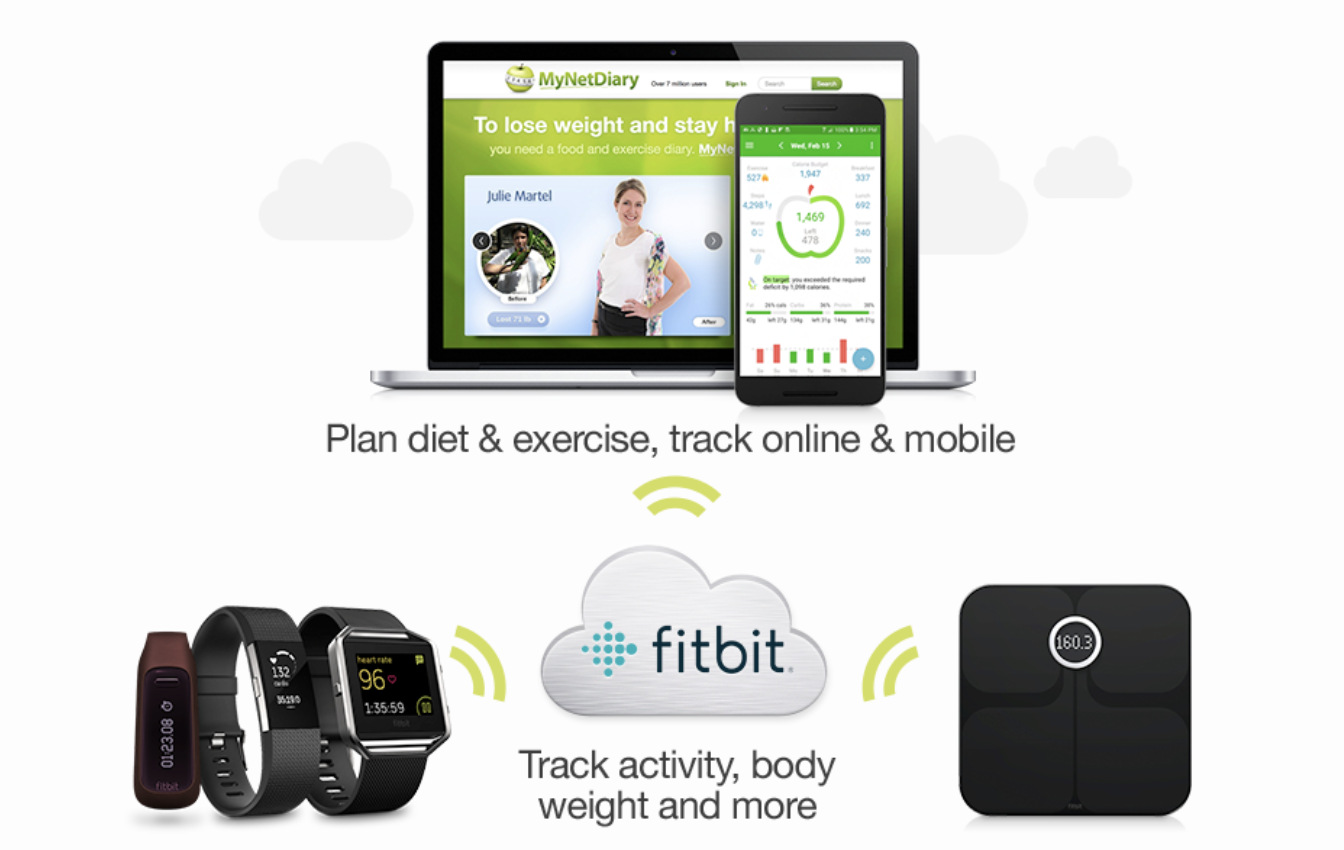
By linking our apps with Fitbit you get the best of both worlds:
- MyNetDiary and PlateAI show the activity calories, daily step count, body weight, sleep hours and average heart rate as measured by Fitbit.
- Fitbit shows your food calories and nutrients tracked by our apps. MyNetDiary and PlateAI also send body weight measurements to Fitbit.
Using Fitbit with MyNetDiary or PlateAI helps to calculate daily calorie balance more accurately, see the actual balance of the calories you burn and eat during the day, and ultimately - helps you lose weight faster and smarter!
We highly recommend using Fitbit for activity and weight tracking, while you use our apps to improve your diet and lose weight.
How does linking work?
Fitbit trackers calculate your activity calories, daily step count, weigh-ins, and more, and sync them to the Fitbit website. Our apps keep track of your foods logged online or via mobile apps. By creating a link, you allow MyNetDiary or PlateAI to talk to Fitbit website and exchange the following data:
- From Fitbit to MyNetDiary and PlateAI
- Exercise burned calories (Inspire 2, Inspire, Inspire HR, Sensa, Versa 3, Versa 2, Versa, Charge 4, Charge 3, Charge 2, Charge, Charge HR, Ace 2, Surge, Alta, Alta HR and Blaze, Flex, One, Zip)
- Daily step count (Inspire 2, Inspire, Inspire HR, Sensa, Versa 3, Versa 2, Charge 4, Charge 3, Charge 2, Charge, Charge HR, Ace 2, Surge, Alta, Alta HR, Blaze, Flex, One, Zip)
- Hours of sleep (Inspire 2, Inspire, Inspire HR, Sensa, Versa 3, Versa 2, Versa, Charge 4, Charge 3, Charge 2, Charge, Charge HR, Surge, Alta, Alta HR, Blaze, Flex, One)
- Body weight and body fat percentage (Aria WiFi Smart Scale)
- The amount of water you drink
- From MyNetDiary and PlateAI to Fitbit
- Daily foods - including food name, calories, fat, fiber, carbs, sodium and protein content
- Body weight and body fat percentage
- The amount of water you drink
You can choose which data can be downloaded from (and uploaded to) Fitbit. Use Fitbit Settings page.
How do I link?
First of all, make sure you Sign Up for MyNetDiary Premium or Upgrade to Premium. Fitbit linking and many other premium features are available with Premium membership.
Step 1: Set up Fitbit account
Please set up your Fitbit account and device as explained at Fitbit website.
Before going further, please verify that your Fitbit account is set up correctly: on the Fitbit website, go to the Activities tab and check if you see the calories and other information uploaded from your Fitbit device.
Step 2: Start linking at MyNetDiary and PlateAI
On the website go to the Settings tab, then click Apps and Devices - Fitbit Settings.
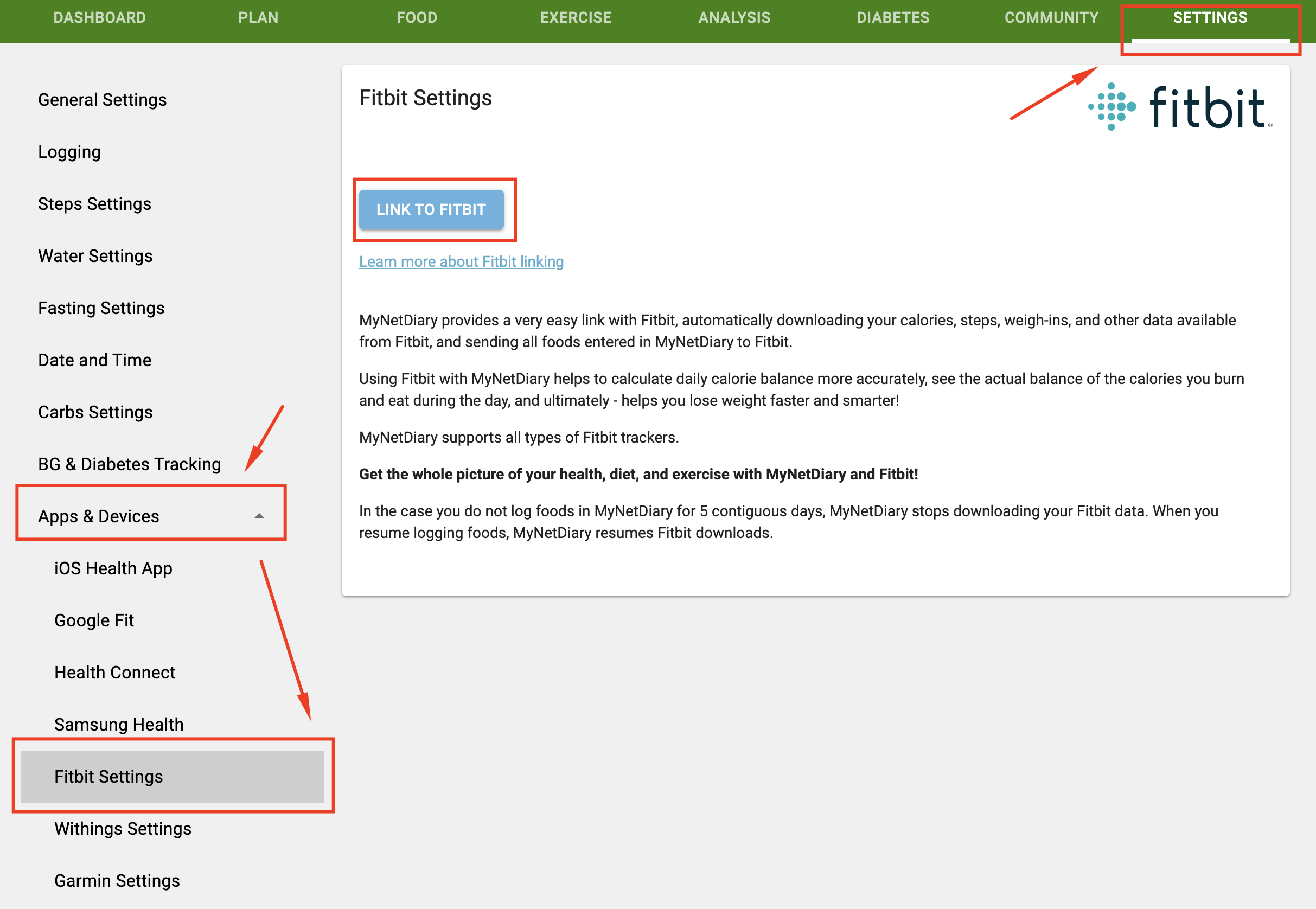
Click “Link to Fitbit” button. You will be redirected to the Fitbit website.
Step 3: Complete linking at Fitbit
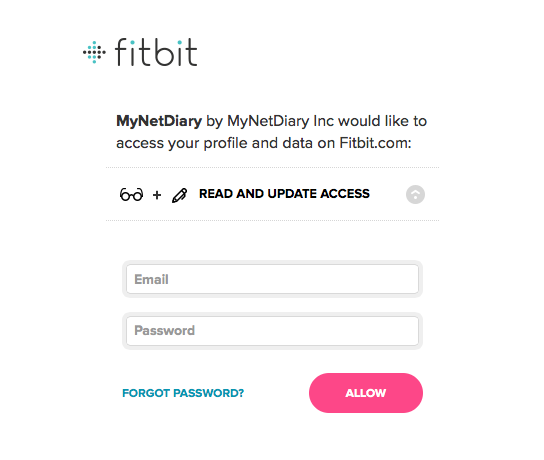
MyNetDiary and PlateAI redirectyou to the Fitbit website, so that you can authorize our app to access your Fitbit data. Enter your Fitbit credentials and click "Allow" button:
After clicking "Allow" button at Fitbit website, you will be returned to website with message indicating that "You are linked to Fitbit":
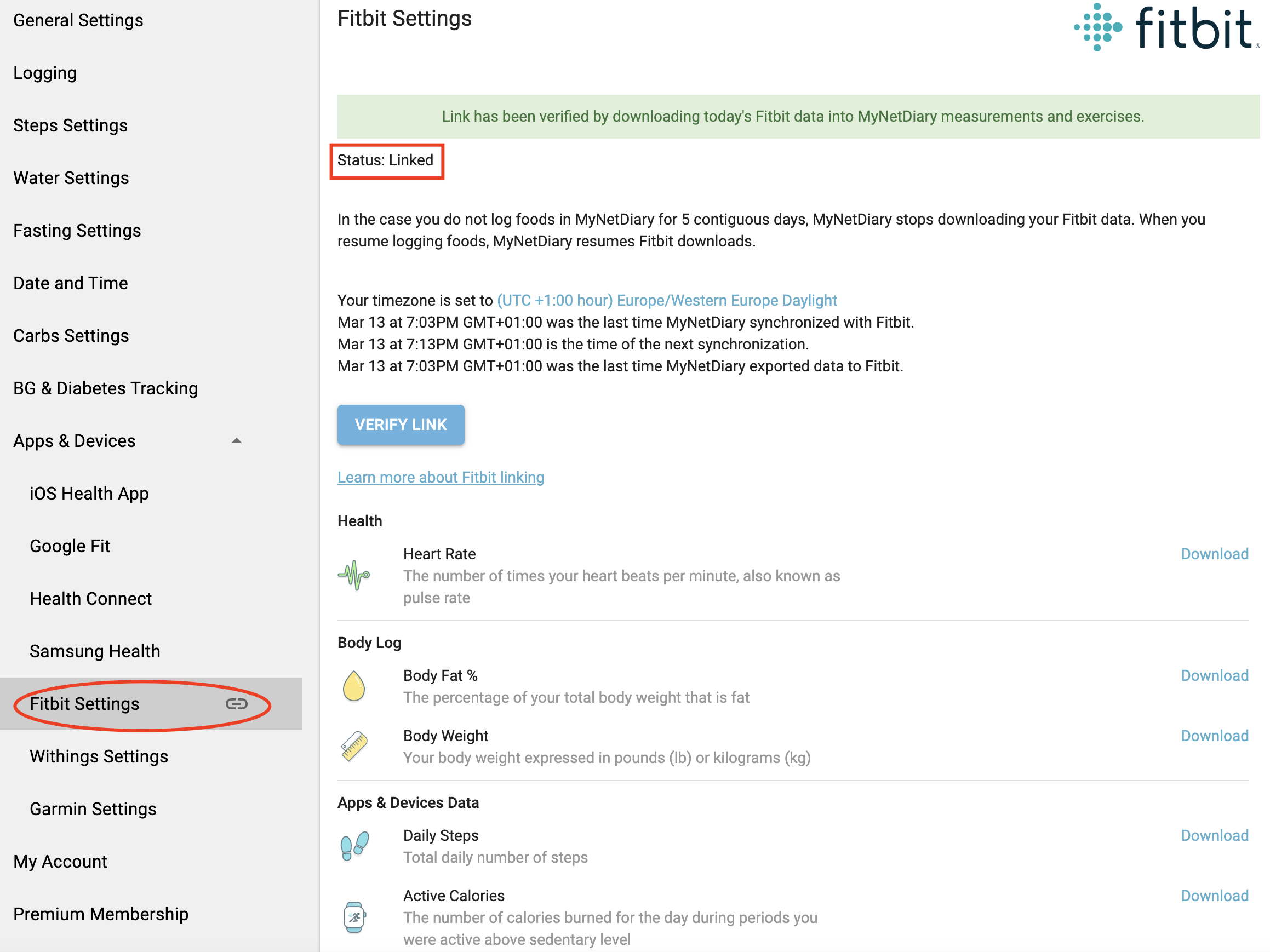
All exchanged data
- Heart Rate
- Body Fat %
- Body Weight
- Daily Steps
- Active Calories - please check the following article for an explanation on this data
- Total Calories Out - this data will appear under Exercise Notes section
- Active Minutes or Inactive Minutes
- Floors - an estimated equivalent of the number of floors climbed that day
- Total Distance Covered (Traveled)
- Activity Tracker BMR - the number of calories your body needs to maintain weight that does not include any other activities taken from your Fitbit account
- Hours of Sleep - including REM, deep sleep and wake hours
- Exported consumed food
- Water Glasses
Exchange details
What happens after I link?
After you link to Fitbit, MyNetDiary and PlateAI perform automatic data exchange within several minutes after you enter foods in our app, one exchange per hour. If you don't log foods for some day, the app will download your Fitbit data during the night. In the case you do not log foods in MyNetDiary or PlateAI for 5 contiguous days, the app stops exchanging your data with Fitbit. When you resume logging foods, our apps resume Fitbit data exchanges.
If you want to expedite the exchange of today's data, go to the Settings/Apps and Devices/Fitbit Settings page and click the "Verify link" button.
MyNetDiary and PlateAI exchange the last 2 days of data after the link is established or restored.
When you sync Fitbit trackers to the Fitbit website, our apps receives a notification from Fitbit within several minutes and automatically downloads new data.
Fitbit exercise vs. Fitbit calories
Fitbit download creates "Fitbit exercise" entry at MyNetDiary or PlateAI Exercise, which is different from the Daily Total Calories you see on Activities tab at Fitbit web site. MyNetDiary or PlateAI exercise includes only the calories burned in addition to normal lifestyle determined by your personal activity level. This is why our apps subtract Weight Maintenance Calories calories from the downloaded total calories:
- Fitbit Active calories = Fitbit Daily Total Calories Burned − Sum(Fitbit Exercises) − Weight Maintenance Calories
If Fitbit total calories minus sum of Fitbit Exercises are less than Weight Maintenance Calories, Fitbit Active calories exercise is set to zero because MyNetDiary and PlateAI planning and analysis features cannot use negative exercise.
Make sure you have chosen the same timezone in our apps and Fitbit, also make sure your body weight, sex and date of birth settings are the same in both systems.
We recommend setting the Activity Level to Sedentary, because "Fitbit exercise" includes only calories above your activity level, so Sedentary level in MyNetDiary and Plate I gives you the most "Fitbit exercise" calories.
Fitbit body measurements
In addition to exercise calories, Fitbit tracker counts daily step count and may determine hours of sleep. Fitbit Aria scale measures body weight and body fat percentage.
MyNetDiary and PlateAI download all these measurements from Fitbit. To see the downloaded measurements in our app, go to MyNetDiary Daily Details page and click “Select Measurements to Track” link.
Catching up on last several days
In the case you would like to repeat Fitbit download for the last 2 days, please use the "Verify Link" button.